SA1227 - Backorder Listing (Detailed by order line)
Overview
SA1227 is a Backordered sales order list that shows a detailed view of customer orders that are yet to be fully delivered. It breaks these orders down not only by Sales order lines but down into a row per scheduled delivery.
This report can be used for detailed or high-level analysis of backordered items and the Sales orders within which they are contained.
Location
Accounts Receivable > Report > Sales order > Backorder Listing (Detailed by order line)
Sample report
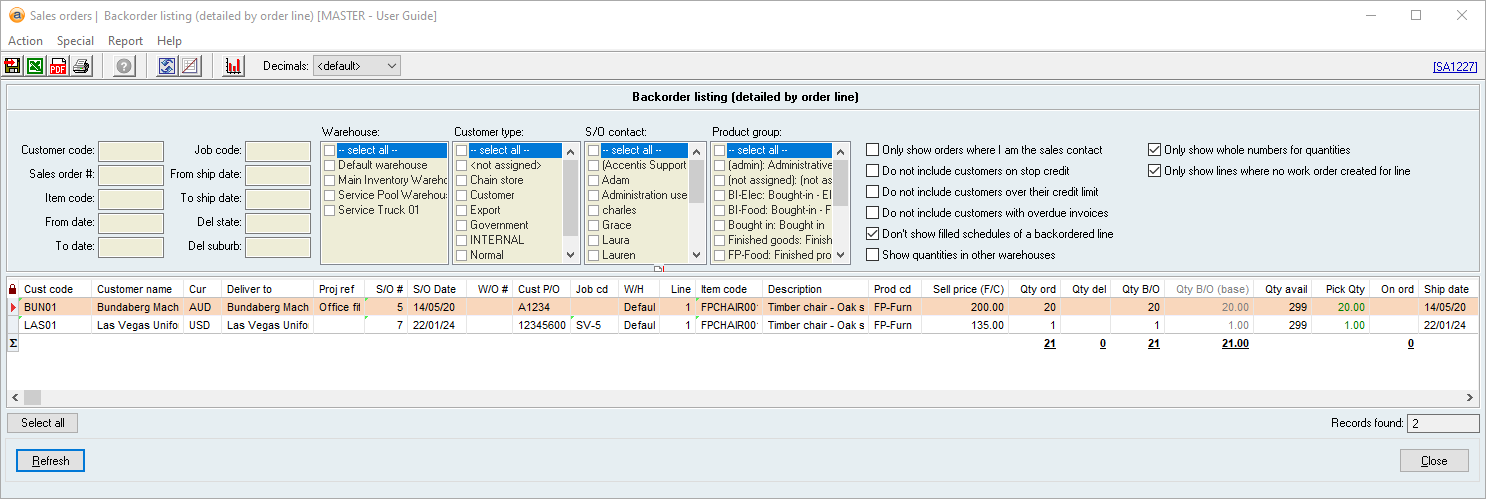
Key filters
 Customer code
Reference: Text, QuickList, Wildcard
This filter allows you to input a Customer code in order to see only Sales order lines assigned to that Customer.
Sales order #
Reference: Text, QuickList, Wildcard
This filter allows you to input a Sales Order # in order to see only Sales order lines contained within a specific Sales order.
From date
Reference: Date, QuickList key
This filter allows you to input the FROM date in a date range in order to see only Sales order lines Date on or after this date.
To date
Reference: Date, QuickList key
This filter allows you to input the TO date in a date range in order to see only Sales order lines Date on or before this date.
From ship date
Reference: Date, QuickList key
This filter allows you to input the FROM date in a date range in order to see only Sales order lines with a Ship date on or after this date.
To ship date
Reference: Date, QuickList key
This filter allows you to input the TO date in a date range in order to see only Sales order lines with a Ship date on or before this date.
Del state
This filter allows you to input a Address lines in order to see only Sales order lines to be delivered to that state.
Del suburb
This filter allows you to input a Address lines in order to see only Sales order lines to be delivered to that suburb.
Customer type
Reference: CheckList
This filter is a multi-select checklist that allows you to display or hide Sales order lines according to the Customer type / Credit terms to which they are assigned.
S/O contact
Reference: CheckList
This filter is a multi-select checklist that allows you to display or hide Sales order lines according to the Our contact to which they are assigned.
Product group
Reference: CheckList
This filter is a multi-select checklist that allows you to display or hide Sales order lines according to the Product group to which they are assigned.
Only show orders where I am the sales contact
Reference: Yes/no
This filter allows you to hide all Sales order lines for which you are not the Our contact.
Do not include customers on stop credit
Reference: Yes/no
This filter will hide Sales order lines assigned to customers on Stop Credit.
Do not include customers over their limit
Reference: Yes/no
This filter will hide Sales order lines assigned to customers who are over their Credit Limit.
Do not include customers with overdue invoices
Reference: Yes/no
This filter will hide Sales order lines assigned to customers who have overdue Sales invoices.
Don’t show filled schedules of a backordered line
Reference: Yes/no
This filter will hide Sales order lines that are part of a Delivery schedule if that delivery has already been dispatched, even if the line as a whole is still on backorder.
Show quantities in other warehouses
Reference: Yes/no
This filter will add separate <Warehouse> for each Warehouse containing the Item.
Only show whole numbers for quantities
Reference: Yes/no
This filter will round all quantities displayed in the report to whole numbers.
Report columns
Cust code
Reference: FlexiCode, Hyperlink
This is the Customer code for the Sales order line.
Customer name
This is the Customer name for the Sales order line.
Deliver to
This is the Address lines for the Sales order line, as specified on the Delivery details tab of the Sales order.
Proj ref
This is the Project reference for the Sales order line.
Description
This is the Item Description of the Sales order line.
Prod cd
This is the Product group of the item of the Sales order line.
Sell price (F/C)
Reference: Currency, Read-only
This is the Sell price of the Sales order line in the currency of the Sales order. The currency to which this value relates can be found in the Cur column of this report.
This may not be the same currency as your database’s native currency.
Qty del
This is the quantity of the item that has been delivered and reflects the net Dispatch qty of every Dispatch linked to the Sales order line.
Qty B/O (base)
This column is the quantity of the item on backorder in terms of the item’s Units / Pricing. This is important for comparison and stock level analysis when an item has units of measure such as cartons or boxes.
For example, if an item has three cartons on backorder, but each carton contains 10 base units, the Qty B/O (Base) column will display 30. This is a more accurate and meaningful figure than a quantity of 3 cartons, particularly if you have multiple backorders for the same item but with different units of measure.
Qty avail
This is the available quantity of the item and represents the Cost / Quantity information in the W/H specified for the Sales order line.
On ord
This is the sum of the Item quantity on all Work orders and backordered Purchase orders.
This column is hyperlinked to SA13 (List of Items on backorder).
<Warehouse>
When the Show quantities in other warehouses filter has been ticked, one additional column per warehouse will be displayed. The column title will be the Warehouse name (e.g., Default, Nundah, etc.) and the column value will be the Cost / Quantity information of the item in each warehouse.
If additional columns are displayed, the sum of their values on a given line will be equal to the value of the Qty avail column.
Ship date
The value of this column depends on whether the Sales order line has a Delivery schedule.
If a delivery schedule exists
This is the Ship Date of that scheduled delivery.
One line will display for every scheduled delivery for a given Sales order line.
If no delivery schedule exists
This is the Date req’d for the Sales order line.
YrM
This is the Ship date column in terms of months of the year and is formatted as YYMM.
For example, if the Ship date was the 8th of February 2024, this column would display 2402.
Showing the ship date in this way allows you to sort columns and subtotal (CTRL-B) by year/month.
YrW
This is the Ship date column in terms of weeks of the year and is formatted as YYWW.
For example, if the Ship date was the 8th of February 2024, this column would display 2406.
Showing the ship date in this way allows you to sort columns and subtotal (CTRL-B) by year/week.
Del suburb
This is the Address lines to which the Sales order line will be delivered, as set on the Delivery details tab of the Sales order.
Del state
This is the Address lines to which the Sales order line will be delivered, as set on the Delivery details tab of the Sales order.
B/O value (XXX)
This is the value of all backordered items on the Sales order line excluding tax, expressed in the currency XXX (which will be the Local currency of your database).
Status
This is the Dispatch of the Sales order on which the line resides in terms of the quantity dispatched. This column will display one of three options:
-

- This option will display if no items on the Sales order have been dispatched.
-

- This option will display if some (but not all) items on the Sales order have been dispatched.
-

- This option will display if the Hold deliveries flag has been ticked on the Delivery details tab of the Sales order.
CL
This flags whether a customer is over their Credit Limit. This value will be Y if the customer is over their Credit Limit and will be blank if they are not.
SC
This flags whether a customer is on Stop Credit. This value will be Y if the customer is on Stop Credit and will be blank if they are not.
$Prepaid
This is the sum of all Pre-payments made against the Sales order, expressed in the Currency of the Sales order.
$Short
This is the remaining unpaid amount for the Sales order ($Order total value less $Prepaid value), expressed in the Currency of the Sales order.
Last edit 22/03/24